Friends, everyone wants to convert their old or accidentally clicked blurred photo into clear and 4k quality. Many times it happens that due to mobile camera shaking, low light or wrong focus, the photo gets clicked blurry. But now you don’t have to worry at all, because now you can easily restore any of your blurred photos with the help of Google Gemini Ai.
In today’s blog, we will tell you how you can convert your or anyone else’s blurry photo into clear, sharp and 4K quality by using an Ai Prompt.
What Is Blur Photo Restore?
Blur Photo Restore is a process in which with the help of Artificial Intelligence (AI) the details of the photo are identified and made clear and sharp again. Google Gemini is a very advanced AI tool. In this, the pixels, lighting and texture of the image are improved by understanding it well.
How To Blur Photo From Google Gemini To 4k Or High Quality?
It is very easy to make Blur Photo 4k or high quality with Google Gemini. You can make your blurred photo high quality in just one click by reading the steps given below.
- So first of all copy the prompt given below and click on “Restoration Image” button.
- Now Google Gemini will open on your phone, sign in with your Gmail.
- After this, click on the (+) icon given below and upload your blurred photo, paste the prompt in the text box and send it.
- Now wait for a few seconds, your image will be created in high quality, then you can download it.
Blur Photo Restoration Ai Prompt (Copy & Paste)
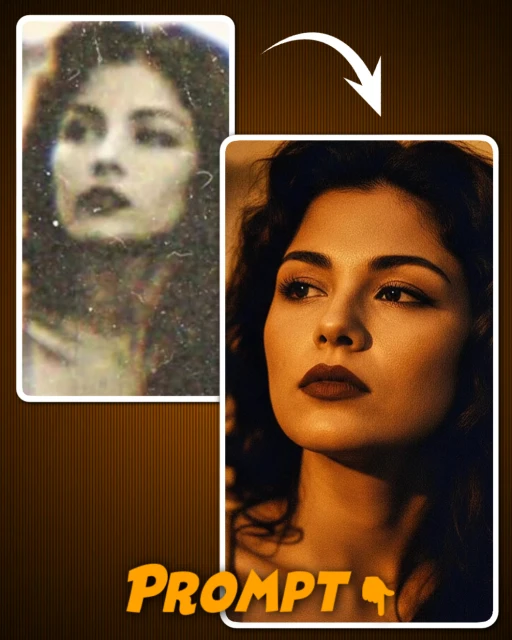
Photo Restoration Prompt
Photo Restoration. Strictly preserve original pose, expression, and composition. Add warm golden-hour side lighting casting a defined, dramatic shadow on the wall behind. Upscale to Ultra-HD: sharpen details, enhance realistic skin texture, and reduce noise. Mood: Mysterious, high-contrast, warm highlights, deep shadows, photorealistic.
Some Important Tips To Get Good Results
- Upload high quality original photo to Google Gemini
- Results may be slightly limited in highly blurred photos.
- You can also add “natural look” and “Realistic Details” to the prompt.
- The most important thing is to avoid over-smoothing face details.
Some Benefits Of Having Blur Photo Restore
There are many benefits of restoring blurred photos. We have discussed some of these benefits below.
- Old memorable photos can be seen as new.
- Can share 4k or HD quality images on social media.
- There is no need of professional editor or software, you can enhance photos with AI tool absolutely free.
Conclusion
If you also have any blurry or old photo, then there is no need to delete it. With the help of Google Gemini Ai, you can convert any blurred photo to clear and 4k in just a few seconds. Just use the right AI Prompt above and give your photo a professional look.