Friends, this is our best editing for Valentine’s Day. We are going to make this editing with the help of artificial intelligence (AI). We have already made all the AI photos of Valentine Week like – Rose Day, Propose Day, Chocolate Day, Teddy Day, Promise Day, Kiss Day, Hug Day. You guys liked all these editings very much. If you have not seen it then you can go and see it.
In today’s post, we are going to teach you how to do Ai Photo Editing for Valentine’s Day. And this editing will also be done in just one click. I will tell you all the steps further. Just keep following the instructions. This editing will also be exactly the same as you did last time. But here the images will be slightly different.
Valentine Day Ai Photo Editing
To create this Valentine’s Day Ai Photo, we will use the same prompts as before. AI Prompts for Valentine’s Day helps you to direct AI tools to easily create beautiful and romantic photos for this special day. This prompt has been prepared very thoughtfully. These prompts let you control the style, mood, color, and detail of your Valentine’s Day photos – whether they’re couple portrait photos or unique love scenes. This prompt is best for creating all types of images.
Prompts (7)
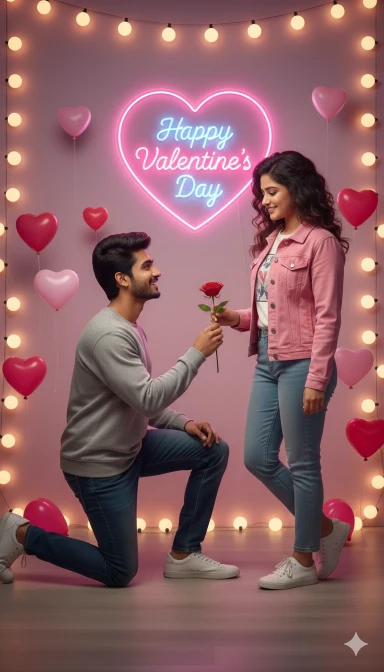
Happy Valentine Day
Use the uploaded boy photo and uploaded girl photo as the ONLY face references.
The faces must match 100% exactly — same facial structure, skin tone, eyes, nose, lips, hairstyle, and identity.
Do NOT create anime, cartoon, illustration, or animated faces.
Faces must look realistic, natural, and human.
Scene: A romantic Valentine Day proposal scene indoors.
The boy is kneeling on one knee, smiling, and offering a red rose to the girl.
The girl is standing casually, smiling softly and looking at the boy.
Background:
– Soft pink and purple wall
– Glowing neon heart light on the wall
– Inside the heart glowing text: “Happy Valentine’s Day”
– Small heart balloons floating around
– Warm decorative lights frame around the scene
Outfit style:
– Boy wearing a stylish sweatshirt, jeans, sneakers
– Girl wearing a casual modern outfit (t-shirt, jacket, jeans, sneakers)
Mood & Lighting:
– Romantic, warm, soft cinematic lighting
– Subtle glow, realistic shadows
Style:
– Ultra-realistic photo
– DSLR look
– Natural skin texture
– NOT anime, NOT cartoon, NOT illustration
Image quality:
– High detail
– Professional photography
– 4K ultra HD resolution
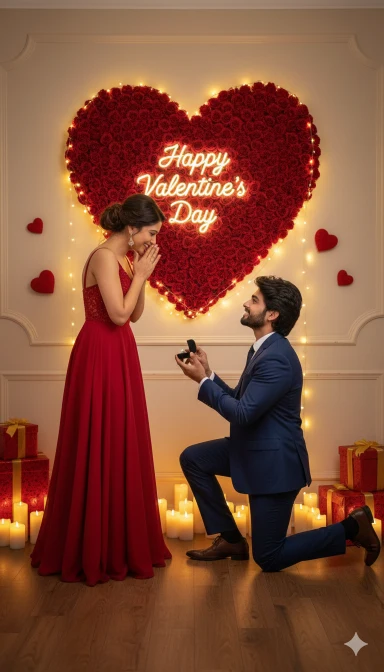
Valentine Day Ai Prompt
IMPORTANT INSTRUCTION:
Use the uploaded boy photo and uploaded girl photo as the PRIMARY, FINAL, and ONLY face references.
The generated couple MUST look like the same real people from the uploaded photos.
Face matching must be as close as possible to the original photos.
STRICT FACE RULES:
– Same facial structure, jawline, eyes, nose, lips
– Same skin tone and age appearance
– Same hairstyle or very similar natural hairstyle
– No change in identity
DO NOT create anime, cartoon, illustration, 3D, Pixar, or doll-like faces.
Faces must look REAL, HUMAN, and PHOTOREALISTIC.
Natural skin texture, visible pores, realistic lighting.
Scene description:
A romantic indoor Valentine’s Day proposal scene.
The boy is kneeling on one knee and holding a small ring box or rose, proposing lovingly.
The girl is standing in front of him, hands near her face, smiling emotionally.
Background setup:
– Large heart shape made of red roses on the wall
– Warm yellow fairy lights glowing around the heart
– Inside the heart text: “Happy Valentine’s Day”
– Small red heart decorations on the wall
– Romantic candles placed on the floor
– Gift boxes placed on both sides
Outfit style:
– Boy wearing a formal or semi-formal suit
– Girl wearing a red romantic dress and heels
Lighting & mood:
– Warm romantic lighting
– Soft shadows
– Cinematic indoor ambience
– Emotional, love-filled atmosphere
Image style & quality:
– Ultra-realistic photography
– DSLR camera look
– Natural colors
– High detail
– 4K ultra HD resolution
FINAL NOTE:
Keep faces realistic and human.
Do NOT stylize faces.
Do NOT make anime or cartoon effects.
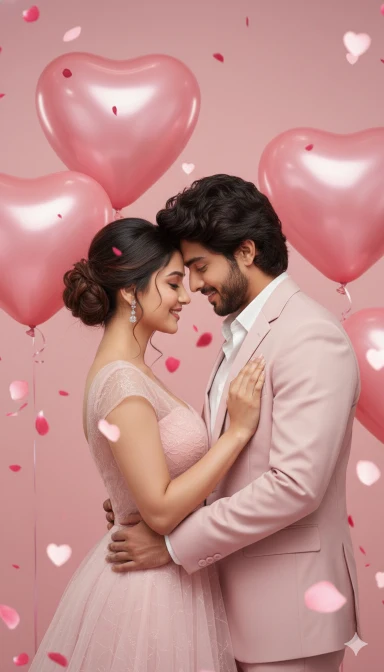
Valentine Day Couple Photo Editing
IMPORTANT INSTRUCTIONS (DO NOT IGNORE):
Use the uploaded boy photo and uploaded girl photo as the PRIMARY, FINAL, and ONLY face references.
The generated couple MUST be the SAME REAL PEOPLE as in the uploaded photos.
Identity must remain unchanged.
STRICT FACE MATCHING RULES:
– Same facial structure, jawline, cheeks
– Same eyes shape, eye distance, eyebrows
– Same nose, lips, chin
– Same skin tone and natural complexion
– Same age appearance
– Same hairstyle or very close natural hairstyle
Do NOT beautify, stylize, smooth, or reshape the faces.
Do NOT generate new or idealized faces.
FACE STYLE REQUIREMENT (VERY STRICT):
– 100% realistic human faces
– DSLR photo look
– Natural skin texture with pores
– Realistic lighting and shadows
– NO anime
– NO cartoon
– NO illustration
– NO 3D or doll-like faces
SCENE DESCRIPTION:
A soft romantic Valentine’s Day couple portrait.
The boy and girl are standing close, gently hugging each other, forehead to forehead, smiling softly.
BACKGROUND DETAILS:
– Soft pink romantic background
– Large pink heart-shaped balloons floating behind them
– Small heart bokeh lights
– Rose petals falling in the air
– Elegant Valentine studio setup
OUTFIT STYLE:
– Boy wearing a pastel pink suit
– Girl wearing a long elegant pink romantic dress
MOOD & LIGHTING:
– Soft dreamy lighting
– Warm romantic glow
– Clean highlights on faces
– Gentle shadows
IMAGE QUALITY:
– Ultra-realistic photography
– Professional DSLR look
– Sharp focus on faces
– High detail
– 4K Ultra HD resolution
FINAL STRICT RULE:
Face accuracy is more important than style or background.
Keep faces as close as possible to the uploaded photos.
Do NOT change identity under any condition.
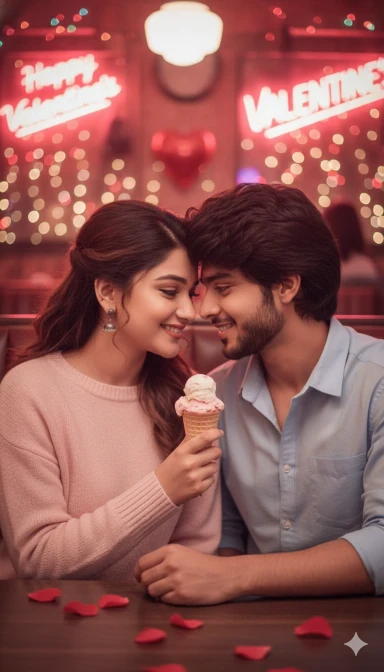
Valentine Day Ai Prompt
IMPORTANT – STRICT INSTRUCTIONS
Use the uploaded boy photo and uploaded girl photo as the PRIMARY, FINAL, and ONLY face references.
The generated couple MUST look like the SAME REAL PEOPLE from the uploaded photos.
Identity must NOT change under any condition.
STRICT FACE MATCHING RULES (VERY IMPORTANT):
– Same facial structure, jawline, cheeks
– Same eyes shape, eyebrows, eye distance
– Same nose, lips, chin
– Same skin tone and natural complexion
– Same age appearance
– Same hairstyle or very close natural hairstyle
Do NOT beautify, stylize, idealize, smooth, or reshape the faces.
Do NOT generate new faces.
FACE STYLE REQUIREMENT:
– 100% realistic human faces
– DSLR photography look
– Natural skin texture with pores
– Realistic lighting and shadows
– NO anime
– NO cartoon
– NO illustration
– NO 3D or doll-like faces
SCENE DESCRIPTION:
A cozy romantic Valentine’s Day café scene.
The boy and girl are sitting very close together in a retro-style café booth.
They are sharing a single ice cream cone, smiling softly, faces close in a cute romantic moment.
BACKGROUND DETAILS:
– Warm red and pink café lighting
– Neon Valentine lights softly glowing
– Romantic bokeh lights in the background
– Cozy indoor café atmosphere
OUTFIT STYLE:
– Casual modern outfits
– Soft pastel or light-colored clothes
MOOD & LIGHTING:
– Warm, intimate, romantic mood
– Soft cinematic lighting
– Gentle shadows on faces
IMAGE QUALITY:
– Ultra-realistic photography
– Professional DSLR camera look
– Sharp focus on faces
– High detail
– 4K Ultra HD resolution
FINAL STRICT RULE:
Face accuracy is more important than pose, background, or style.
Keep faces as close as possible to the uploaded photos.
Do NOT change identity under any condition.
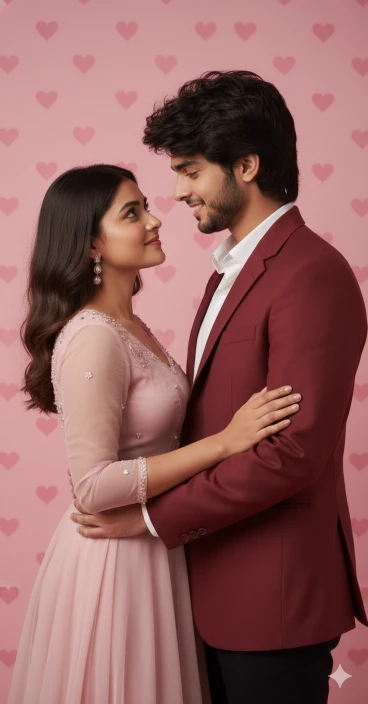
Valentine Day Photo Editing Prompt
IMPORTANT – STRICT FACE INSTRUCTIONS
Use the uploaded boy photo and uploaded girl photo as the PRIMARY, FINAL, and ONLY face references.
The generated couple MUST look like the SAME REAL PEOPLE from the uploaded photos.
Identity must NOT change under any condition.
STRICT FACE MATCHING RULES:
– Same facial structure, jawline, cheeks
– Same eyes shape, eye distance, eyebrows
– Same nose, lips, chin
– Same skin tone and natural complexion
– Same age appearance
– Same hairstyle or very close natural hairstyle
Do NOT beautify, stylize, smooth, reshape, or idealize the faces.
Do NOT generate new or different faces.
FACE STYLE REQUIREMENT (VERY STRICT):
– 100% realistic human faces
– DSLR photo look
– Natural skin texture with pores
– Realistic lighting and shadows
– NO anime
– NO cartoon
– NO illustration
– NO 3D / doll / Pixar style
SCENE DESCRIPTION:
A close romantic Valentine’s Day portrait.
The boy and girl are standing very close, gently holding each other, smiling softly and looking into each other’s eyes.
BACKGROUND DETAILS:
– Soft pink Valentine background
– Repeating heart patterns on the wall
– Clean, aesthetic studio setup
– Minimal and elegant look
OUTFIT STYLE:
– Boy wearing a red or pink formal jacket
– Girl wearing a soft pink romantic dress
MOOD & LIGHTING:
– Soft, warm, romantic lighting
– Gentle highlights on faces
– Natural shadows
– Calm, love-filled mood
IMAGE QUALITY:
– Ultra-realistic photography
– Professional DSLR camera look
– Sharp focus on faces
– High detail
– 4K Ultra HD resolution
FINAL STRICT RULE:
Face accuracy is the highest priority.
Keep faces as close as possible to the uploaded photos.
Do NOT change identity under any condition.
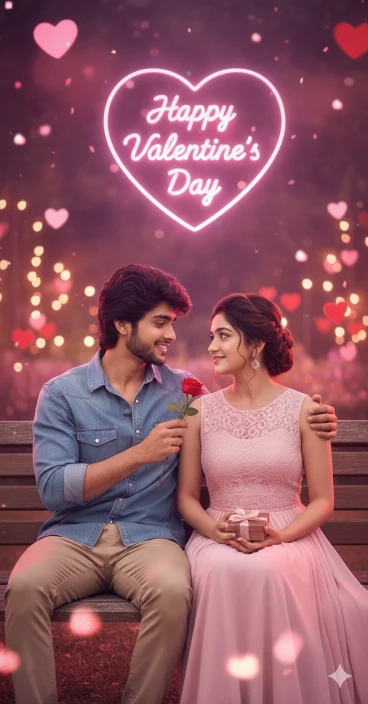
Valentine Day Night View
Use the uploaded boy and girl reference images and keep their faces 100% identical with exact facial structure, skin tone, eyes, nose, lips and expression.
Do not change the faces at all. No anime, no cartoon, no illustration look.
Ultra-realistic cinematic style only.Scene: Valentine’s Day romantic setup.
Both sitting together on a wooden bench in a dreamy outdoor park.
Soft glowing lights, pink and red hearts hanging around, blurred background with romantic bokeh.
Warm pink and purple lighting, magical atmosphere.Boy pose: sitting casually, one arm resting behind the girl, holding a red rose in hand.
Girl pose: sitting close, smiling naturally, holding a small gift box.
Expressions should look loving, cute and natural.Outfits: modern casual romantic outfits similar to reference vibe.
Skin texture, hair details and lighting should look realistic and high quality.Text: Write glowing neon text “Happy Valentine Day” clearly visible in the background inside a heart shape.
Font should be romantic and stylish.Camera: mid-shot, eye-level, shallow depth of field.
Quality: ultra HD, highly detailed, cinematic lighting, professional Valentine photoshoot look.
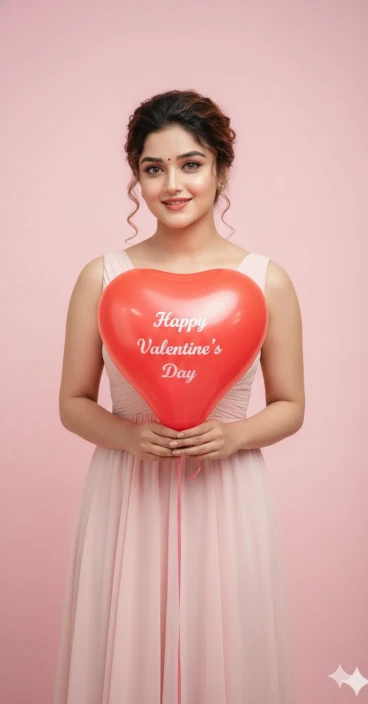
Valentine Day New Prompt
Use the uploaded girl reference image and keep her face 100% identical.
Exact facial structure, skin tone, eyes, smile and expression must match perfectly.
Do not change the face at all.
No anime, no cartoon, no illustration.
Ultra-realistic photography style only.Scene: Valentine’s Day themed portrait.
Girl standing against a soft pastel pink background wall.
Background should be clean, minimal and evenly pink.She is holding a glossy red heart-shaped balloon with a string.
The balloon should look realistic and shiny.Text on balloon: Clearly write “Happy Valentine Day” in white romantic handwritten style font.
Text must be readable and centered on the balloon.Outfit: elegant solid pink dress only (no patterns, no other colors).
Dress fabric should look soft, realistic and romantic.Hair, skin texture and facial details must remain exactly as in the reference image.
Lighting: soft natural daylight, warm romantic tone, smooth shadows.
Camera: medium portrait shot, eye-level.
Quality: ultra HD, DSLR photography look, highly detailed, professional Valentine photoshoot.
How To Make Valentine Day Ai Photo Using Google Gemini?
It is very easy to create Valentine Day photo using the prompt in Google Gemini. You can easily create it with the help of the tips given below.
- So first of all copy your favorite prompt from the prompt given above. And tap on “create image” button.
- Now Google Gemini will open, then tap on the (+) icon and upload a good photo of yourself.
- Now paste the prompt in place of the text box and send it.
- Now in some time your Saraswati Puja AI image will be created, then you can download it.
Conclusion
In this way you can create any Valentine’s Day or Valentine’s Week ai photo editing very easily. How did you like this AI photo editing? Do let us know because we have tried our best to teach it to you and explained it well. If you have any questions, you can ask us in the comments or by emailing us.
FAQ
Can I Create Personalized Couple Photos For Valentine’s Day Using Ai?
Yes. The Google Gemini AI tool lets you upload a reference image to guide the AI. In this you can create a wonderful photo for any Valentine’s Day. And you can also add your favorite romantic light setup, clothes or background.
Which Ai Tools Are Best For Valentine’s Day Image Generation?
Google Gemini is best for Valentine’s Day AI image generation. Because it gives 100% realistic results
How Can I Create Beautiful Valentine’s Day Photos With The Help Of Ai?
You can create Valentine’s Day images using the Google Gemini AI image generator. To become an AI photo, all it takes is a promotion and a simple photo.